
Understanding OpenClaw Architecture: How Markdown Replaces Vector Databases for AI Agent Memory
The AI agent space has a memory problem — and I don’t mean the kind you solve by upgrading your GPU.

Most agents today are stateless. Every conversation starts from zero. The coding assistant that helped you architect an entire authentication flow on Tuesday has absolutely no idea who you are on Wednesday morning. You’re back to explaining your tech stack, your preferences, your project structure, all over again.
The default industry response has been to bolt on a Vector Database. Embed everything into high-dimensional vectors, store them in Pinecone or Weaviate or Chroma, run semantic similarity search at runtime. It works. For some use cases, it’s the right call. But it also introduces infrastructure complexity, latency, cost, and a layer of opacity that makes debugging a nightmare.
OpenClaw framework takes a fundamentally different architectural approach. Instead of databases and embeddings, the entire memory system runs on Markdown files. Plain text. Sitting right there in your project directory where you can read them, edit them, version them with git, or delete them whenever you want.
This post is a deep dive into how OpenClaw’s memory architecture actually works — the storage layer, the lifecycle triggers, the consolidation engine, and the design decisions that make it all hold together.
What is OpenClaw?
OpenClaw is an open-source agent framework built around a single core idea: your AI agent’s memory should be as transparent and editable as any other file in your project.
The framework is designed for personal AI agents — the kind of tool that lives in your terminal, helps you write code, and ideally gets better at its job the longer you use it. Think of it as the architectural opposite of enterprise RAG pipelines. Where those systems optimize for scale and multi-tenancy, OpenClaw optimizes for depth and continuity with a single user.
The design philosophy rests on three principles:
Local-first. Everything stays on your machine. No cloud vector stores, no external APIs for memory retrieval. Your data doesn’t leave your workspace.
Human-readable. Every piece of memory the agent stores is in Markdown. You can open it, read it, understand it, and change it with any text editor.
Zero infrastructure. No database migrations, no Docker containers for your memory layer, no additional services to keep running. Just files and folders.
What makes OpenClaw worth studying isn’t just that it works — it’s that it works well despite being architecturally simple. And that simplicity is a deliberate design choice, not a limitation.
How OpenClaw Fits Into the Broader Agent Landscape
To understand what makes OpenClaw’s architecture distinctive, it helps to see where it sits relative to other frameworks.
LangChain and LlamaIndex are the workhorses of the RAG world. They’re built for retrieval-heavy workflows — ingest thousands of documents, chunk them, embed them, search them at query time. Memory is a module you bolt on, usually backed by a vector store. Great for enterprise search. Overkill for a personal coding agent that needs to remember you prefer tabs over spaces.
CrewAI and AutoGen focus on multi-agent orchestration. Their memory concerns are about inter-agent communication — how does Agent A share context with Agent B? OpenClaw isn’t solving that problem. It’s solving the simpler but equally important problem of how a single agent maintains continuity with a single human over weeks and months.
Cursor and Windsurf and other AI code editors have their own memory approaches, but they’re tightly coupled to the editor. OpenClaw’s memory layer is editor-agnostic and framework-agnostic. It’s a pattern you could lift and apply to almost any agent architecture.
The closest philosophical neighbor is probably Mem0 (formerly EmbedChain’s memory layer), which also focuses on personal agent memory. But where Mem0 still leans on vector embeddings under the hood, OpenClaw commits fully to the text-file approach.
OpenClaw’s Memory Model: Three Types of Context
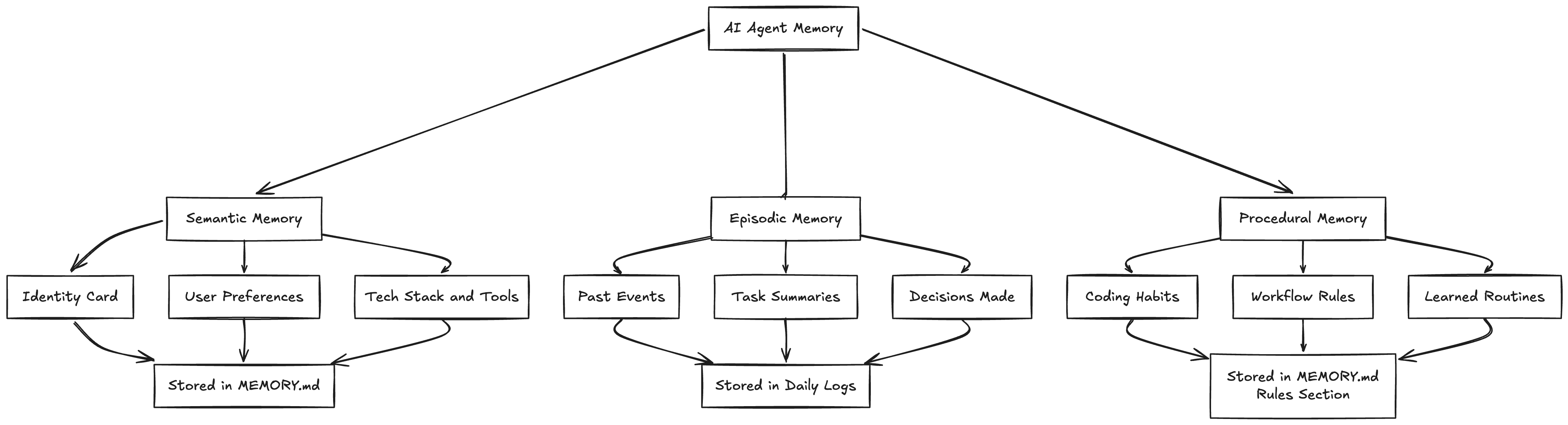
Before getting into the mechanics, OpenClaw needs a clear definition of what “memory” actually means. The framework draws heavily from Google’s Context Engineering whitepaper and breaks memory into three distinct categories. Each one has different characteristics, different storage requirements, and different read/write patterns.
Semantic Memory is the identity card. These are stable, slow-changing facts about the user. Your name, your preferred language, your tech stack, the fact that you always use conventional commits. This information rarely changes and needs to be available in every single conversation. When it does change, the old version gets replaced entirely — there’s no reason to keep “User prefers JavaScript” around once they’ve switched to TypeScript.
Episodic Memory is the journal. These are events tied to time. “On Tuesday we refactored the auth module.” “Last week we decided to use Redis for caching.” “The client demo is scheduled for Friday.” Episodic memories are useful for continuity and context, but they have a natural expiration. What you did three months ago matters less than what you did yesterday.
Procedural Memory is the workflow manual. These are learned routines and rules. “Always run lint before committing.” “Use the company’s error handling pattern for API calls.” “Never push directly to main.” Procedural memories sit somewhere between semantic and episodic — they’re persistent like preferences but behavioral like habits.
Most agent memory systems dump all three types into the same store, which is why retrieval often feels off. OpenClaw keeps them separated, and that separation is what makes the rest of the architecture work.
OpenClaw’s Storage Layer
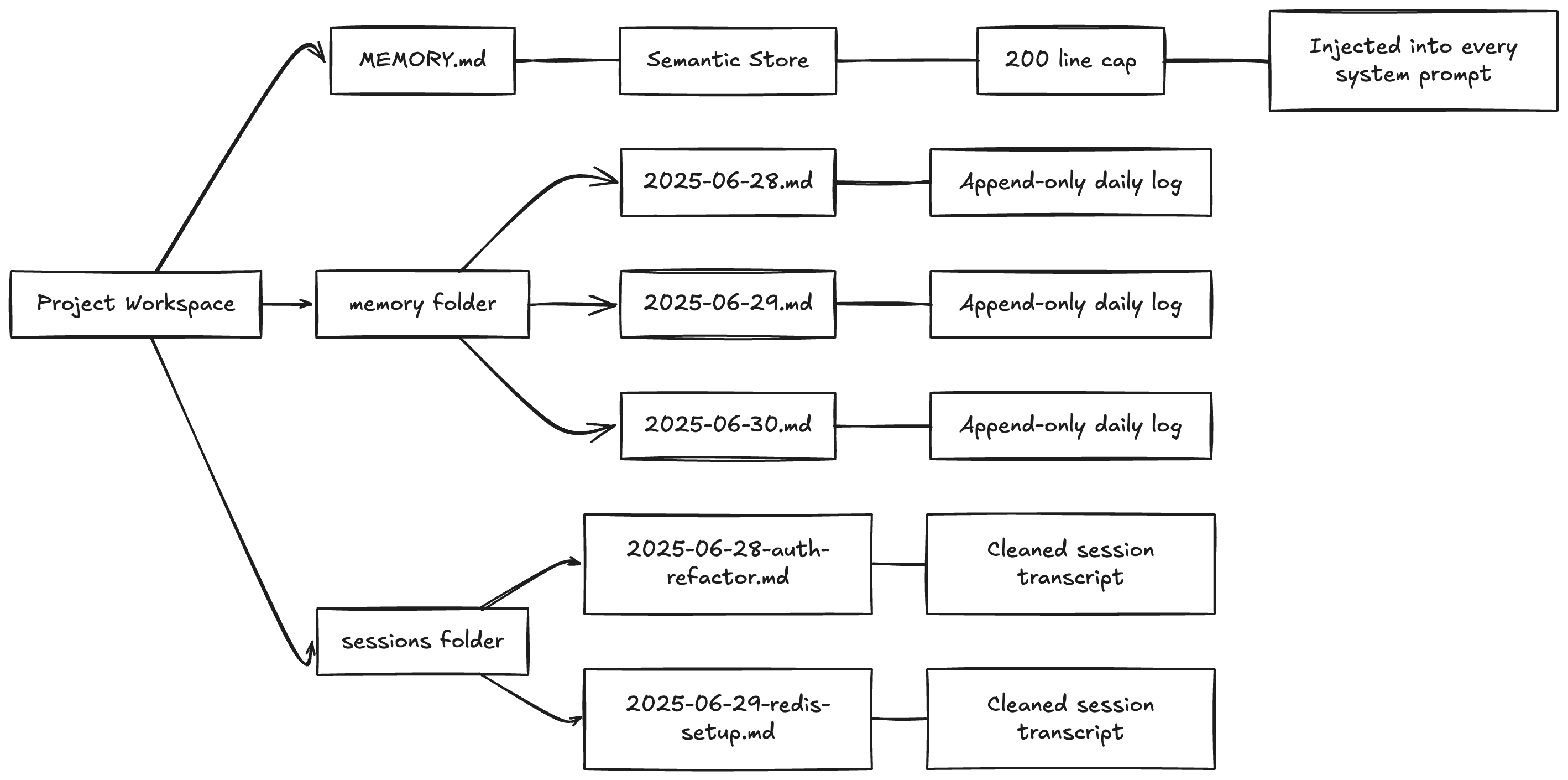
The storage layer is almost aggressively simple. No ORM, no schema migrations, no connection strings. Just a folder structure that any developer would understand at first glance.
MEMORY.md — The Semantic Store
This is the most important file in the entire system. It’s a structured Markdown document containing everything the agent permanently knows about you. A real MEMORY.md might look something like this:
## User Profile
- Name: Alex
- Location: Berlin, Germany
- Timezone: CET (UTC+1)

## Tech Stack
- Primary Language: TypeScript
- Framework: Next.js 14 (App Router)
- Database: PostgreSQL with Prisma ORM
- Hosting: Vercel
- Package Manager: pnpm

## Coding Preferences
- Prefers functional components over class components
- Uses Tailwind CSS, avoids CSS-in-JS
- Prefers explicit error handling over try-catch-all
- Always uses strict TypeScript (no 'any')

## Project Context
- Currently building a SaaS dashboard for inventory management
- MVP deadline: March 2025
- Solo developer, no team

## Communication Style
- Prefers concise explanations
- Likes seeing code examples before theory
- Hates unnecessary comments in code
Two critical design decisions here. First, MEMORY.md gets injected into the system prompt of every conversation. This means the agent never has to retrieve your preferences — they’re always in context, always available, zero latency.
Second, there’s a hard cap of around 200 lines. This is a constraint born from necessity — system prompts eat into your context window, and you don’t want half your available tokens consumed by memory. But it’s also a forcing function for quality. The system has to be ruthless about what’s actually worth permanent storage versus what’s just noise.
Daily Logs — The Episodic Timeline
Located in memory/YYYY-MM-DD.md, these are append-only files. Every significant decision, every task summary, every notable event gets timestamped and written here.
## 2025-06-28

### 14:30 - Auth Module Refactor
- Decided to switch from JWT stored in localStorage to httpOnly cookies
- Implemented refresh token rotation
- User wants to add rate limiting next session

### 16:45 - Database Schema Update
- Added 'last_login' column to users table
- Created migration file: 20250628_add_last_login.sql
The append-only constraint is important. Daily logs are a historical record — they should never be edited after the fact. If a decision gets reversed later, that reversal gets its own entry on its own date. This gives you a complete timeline you can trace back through.
Session Snapshots — The Context Buffer
When a session ends, the actual dialogue gets captured and saved. But not the raw transcript — the system strips out tool calls, API responses, system messages, and other noise, leaving only the meaningful human-AI exchange. Filenames are descriptive: 2025-06-28-auth-refactor.md, 2025-06-29-redis-setup.md.
These snapshots serve two purposes. Short-term, they let you resume a conversation thread. Long-term, they’re an audit trail — you can go back and understand not just what was decided, but why.
OpenClaw’s Memory Lifecycle: The Four Triggers
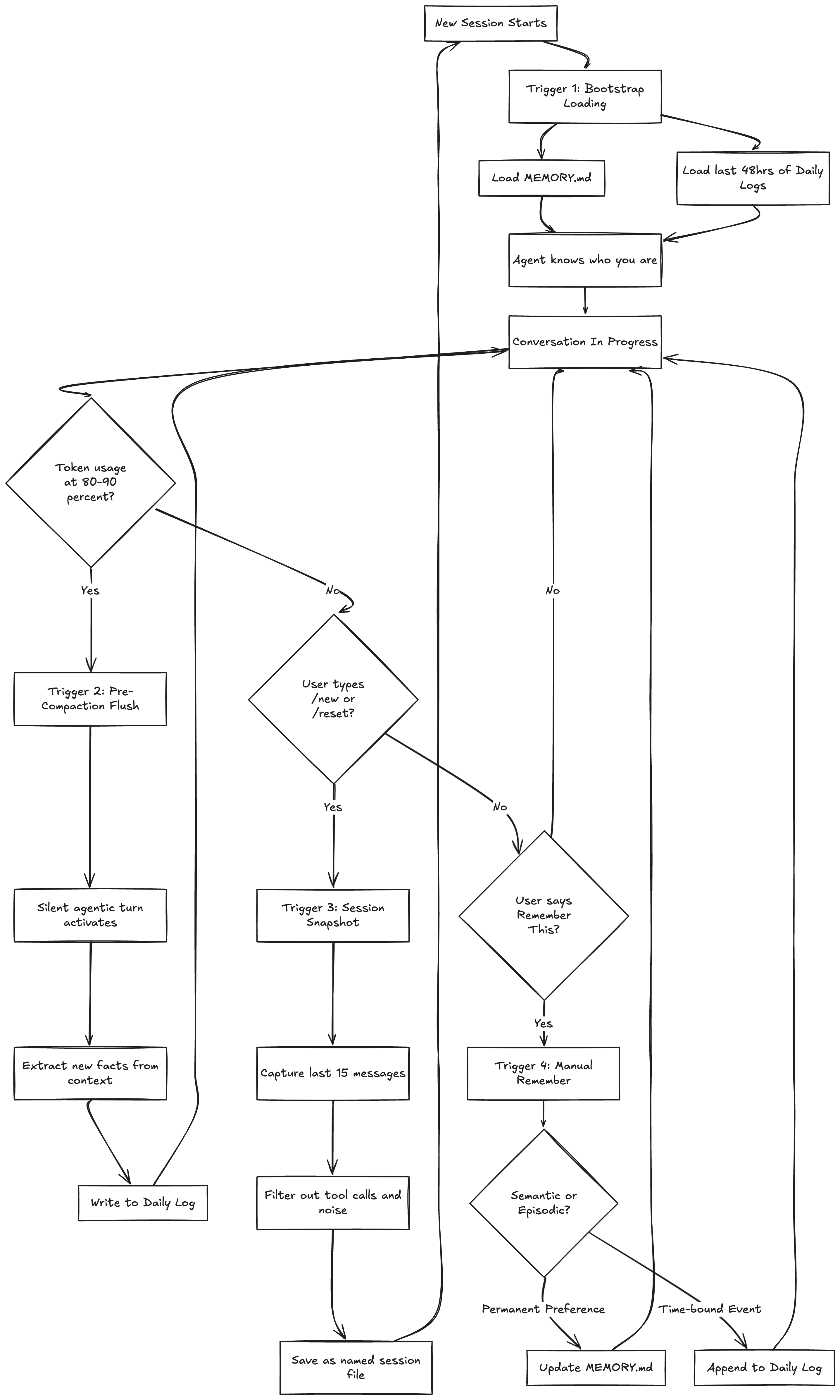
A storage layer without read/write logic is just a filing cabinet. The real architecture lives in the triggers — the four specific mechanisms that move information between the active context window (working memory) and the persistent file system (long-term storage).
Each trigger addresses a different failure mode, and together they form a complete lifecycle.
Trigger 1: Bootstrap Loading
Every new session begins with a boot sequence. The agent loads two things:
The full
MEMORY.mdfile (semantic context)The last 48 hours of daily logs (recent episodic context)
That’s it. No vector search, no retrieval pipeline, no ranking algorithm. Just read two files and the agent immediately knows who you are, what you’re working on, and what happened recently.
The 48-hour window is a pragmatic choice. It captures “yesterday and today” — the most likely continuation context — without flooding the prompt with weeks of history. If the agent needs something older, the user can point it there manually, or the daily logs can be searched directly.
This bootstrap is what makes the agent feel like it “remembers” you between sessions. There’s nothing clever happening under the hood. It’s just reading your profile and recent notes, the same way you’d skim your own notes before picking up a task.
Trigger 2: Pre-Compaction Flush
This is the most architecturally interesting trigger, and it solves a problem that quietly ruins most long-running agent conversations.
Every LLM has a finite context window. When the conversation exceeds that limit, the framework performs “context compaction” — silently dropping the oldest messages to make room for new ones. This happens automatically in most agent frameworks, and it’s invisible to the user.
The problem is brutal: important decisions made early in a conversation — “we agreed to use Redis,” “the client wants error messages in Spanish,” “don’t touch the legacy payment module” — just vanish. The agent keeps talking, but it’s lost critical context.
OpenClaw monitors token usage throughout the conversation. When it detects the context has hit 80-90% capacity, it triggers what the framework calls a “silent agentic turn.” Here’s what happens:
The agent pauses its normal flow
It scans the entire current context window
It extracts anything that looks like a decision, preference, or important fact
It writes those extractions to the current daily log
Normal conversation resumes
All of this happens transparently. The user doesn’t see a “saving memory...” message. The agent doesn’t interrupt the flow. It just quietly ensures that nothing important dies when the compaction window slides forward.
Think of it as the agent frantically scribbling notes on a napkin right before someone wipes the whiteboard.
Trigger 3: Session Snapshot
When a user explicitly ends a session — typing /new or /reset — the agent knows its entire working memory is about to be destroyed. Before that happens, a hook activates:
Capture the last 15 meaningful messages
Filter out tool calls, API responses, and system noise
Generate a descriptive filename based on the conversation’s main topic
Save the cleaned transcript to the sessions folder
This is the “save game” mechanic. The 15-message limit is another pragmatic constraint — it captures the most recent and relevant context without creating bloated snapshot files. The descriptive filename (2025-06-28-auth-refactor.md rather than session-47.md) means you can find things later without having to open every file.
Trigger 4: Manual “Remember This”
Sometimes the user just wants to tell the agent something explicitly. “Remember that I prefer dark mode.” “Remember that the client’s deadline got pushed to April.”
When this happens, the agent has to make a classification decision: is this semantic or episodic?
“I prefer dark mode” → Semantic. Goes into MEMORY.md as a permanent preference.
“The client deadline is April 15th” → Episodic. Goes into today’s daily log as a time-bound fact.
“Always run tests before pushing” → Procedural. Goes into MEMORY.md as a workflow rule.
This classification is what separates a real memory system from a glorified append log. Getting it wrong — storing a temporary deadline as a permanent preference, or treating a core preference as a fleeting event — degrades the agent’s effectiveness over time.
OpenClaw’s Extraction and Consolidation Engine
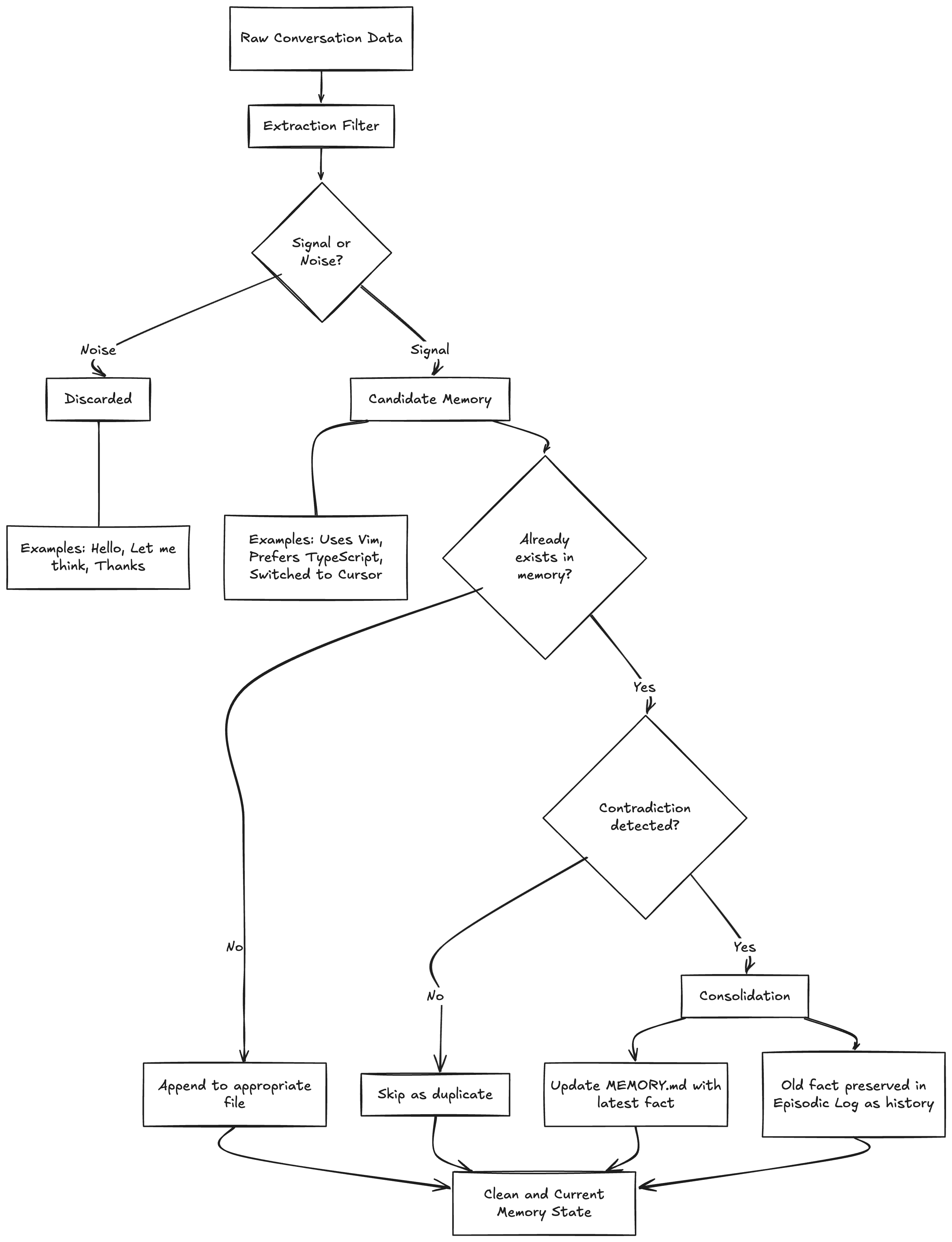
If you just naively store everything the agent encounters, the memory files become garbage within a week. “Hello” gets stored. “Let me think about that” gets stored. “Can you make the button blue? No wait, red. Actually, blue was fine” generates three contradictory entries.
OpenClaw handles this with two complementary processes that act as quality control for the memory layer.
Extraction: The Signal-Noise Filter
Before anything gets written to persistent storage, the agent evaluates whether it’s signal or noise. This isn’t a rule-based filter with a list of stop words — it’s a judgment call the LLM makes based on its instructions.
Noise examples: “Hello,” “Thanks,” “Let me think about that,” “Can you explain more?” — conversational filler with no informational content.
Signal examples: “I use Vim keybindings,” “We decided to switch to GraphQL,” “The API rate limit is 100 requests per minute” — facts, decisions, and preferences that would be useful in future sessions.
The extraction step is imperfect by design. It’s better to occasionally miss a piece of signal than to pollute the memory with noise. The user can always use the manual “remember this” trigger for anything critical that the extraction might miss.
Consolidation: Deduplication and Conflict Resolution
The harder problem is what happens when the same information shows up multiple times, or when new information contradicts old information.
If the user says “I like dark mode” in three different sessions, the memory shouldn’t have three identical entries. If MEMORY.md says “User uses VS Code” but this week’s log says “User switched to Cursor,” the system needs to handle that contradiction.
OpenClaw’s consolidation logic works like this:
Duplicate detection. Before writing a new semantic memory, check if an equivalent entry already exists. If it does, skip the write.
Contradiction resolution. If a new fact contradicts an existing semantic memory, the new fact wins. MEMORY.md gets updated to reflect the current state. The old fact doesn’t disappear entirely — it lives on in the episodic log as historical record — but the “source of truth” stays clean and current.
Periodic cleanup. The system occasionally scans MEMORY.md for entries that have become stale or irrelevant, reclaiming lines against the 200-line cap.
This is actually one of the areas where the Markdown approach has a real advantage over vector databases. In a vector store, contradiction resolution requires some kind of graph-based logic layered on top of your embeddings — you need to know that “uses VS Code” and “uses Cursor” are about the same concept (editor preference) and that one supersedes the other. With Markdown, the structure is explicit and the LLM can reason about it directly.
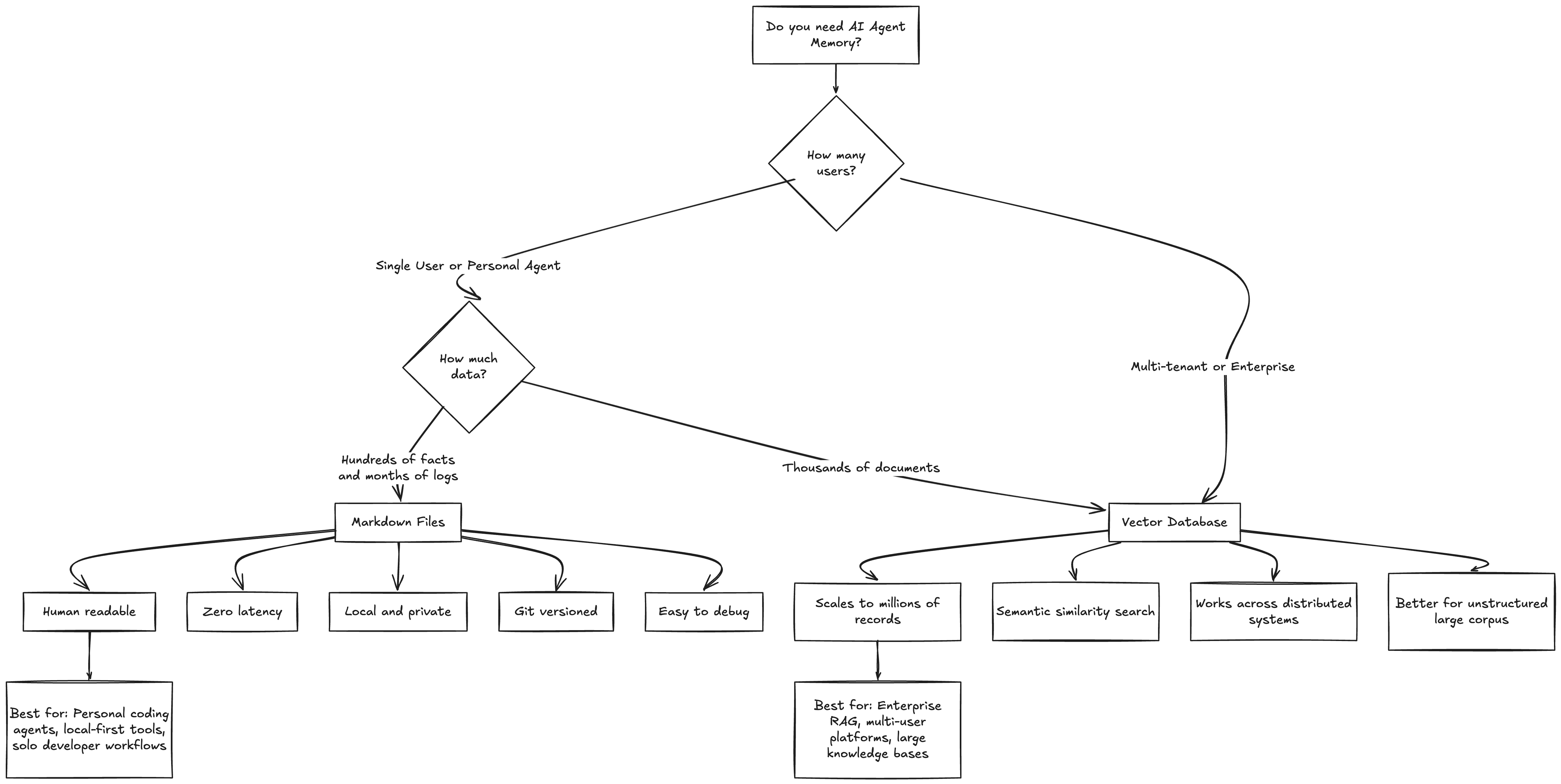
Markdown vs Vector Databases: OpenClaw’s Trade-offs
I want to be fair here. OpenClaw’s architecture makes deliberate trade-offs, and understanding those trade-offs is essential to knowing when this approach is the right one.
Where Markdown Wins
Readability. You can open MEMORY.md in any text editor and see exactly what your agent knows about you. Try doing that with a vector store. You’d need to write a query, decode the embeddings, and hope the similarity search returns what you’re looking for.
Latency. Reading a 200-line text file is essentially free. A vector similarity search, even on a local instance, has measurable overhead. For an agent that might check memory multiple times per response, this adds up.
Privacy. Your memory stays on your machine, in your project folder, versioned by git. No third-party cloud service holding your preferences and conversation history.
Debuggability. When your agent says something weird — maybe it’s insisting you use a library you’ve never heard of — you can go read the memory file and immediately understand why. With vectors, debugging retrieval issues is an archaeology expedition through embedding spaces.
Editability. Don’t like something the agent remembers? Open the file. Delete the line. Done. No API calls, no admin dashboards, no “please delete my data” requests.
Where Vector Databases Win
Scale. If you need to search through 10,000 documents or maintain memory for thousands of users, Markdown files won’t cut it. Vector databases are built for exactly this scale.
Semantic search. “Find me conversations where we discussed performance optimization” is a natural language query that vector similarity handles gracefully. With Markdown, you’re limited to keyword search or asking the LLM to scan files manually.
Unstructured data. PDFs, images, audio transcripts — vector databases can embed and index anything. OpenClaw’s approach is inherently text-centric.
Multi-tenancy. Enterprise applications serving thousands of users need proper database infrastructure. One folder per user doesn’t scale to organizational use cases.
The Bottom Line
OpenClaw’s architecture is purpose-built for a specific use case: a single human working with a single agent over an extended period. For that scenario, the Markdown approach isn’t just simpler — it’s genuinely better along most dimensions that matter. The moment you need multi-user support, massive document search, or cross-agent memory sharing, you’re in vector database territory.
What Agent Builders Can Learn From OpenClaw
The most valuable thing about studying OpenClaw’s architecture isn’t the specific implementation — it’s the design thinking behind it.
The AI industry has a pattern of reaching for infrastructure solutions to design problems. “The agent doesn’t remember things” immediately becomes “we need a vector database” rather than “we need to think carefully about what’s worth remembering, where it should go, and when it should be written.”
Those three questions — what, where, and when — are the entire memory design framework. Everything else is plumbing. And OpenClaw proves that the plumbing can be shockingly simple if the design is sound.
If you’re building your own agent, here’s what I’d take from OpenClaw’s approach:
Separate your memory types. Don’t dump everything into one store. Semantic, episodic, and procedural memories have different lifecycles and different access patterns. Treat them differently.
Design your triggers before your storage. Deciding when memory gets written is more important than deciding where it gets stored. The four-trigger model — bootstrap, pre-compaction, session snapshot, manual — covers the full lifecycle. Start there.
Make memory inspectable. Whatever storage you choose, give users a way to see and edit what the agent knows. Trust is built on transparency, and transparency requires readability.
Constrain aggressively. The 200-line cap on MEMORY.md, the 48-hour bootstrap window, the 15-message snapshot limit — these constraints aren’t limitations. They’re design decisions that force quality over quantity.
Start with Markdown, graduate if you need to. Even if you end up choosing a vector database, design your memory system in plain text first. Treat it as a spec. Once the design is solid, the storage layer becomes an implementation detail.
OpenClaw’s architecture isn’t going to replace Pinecone for enterprise RAG. It’s not trying to. What it does is demonstrate that good memory design is about policy, not plumbing — and that a well-designed policy can run on nothing more than a folder full of text files.
Who am I: 4x founding engineer across multiple startups. Head of Engineering & Research at a YC-backed company. 68+ production systems deployed - spanning the full spectrum of AI, from voice to document intelligence. Currently pursuing a PhD in Reinforcement Learning for LLMs. 10+ hackathon wins and counting.