
Stop Guessing: A Systematic Guide to Fixing CUDA Out of Memory Errors in GRPO Training
A practical guide to diagnosing GPU memory issues instead of randomly changing hyperparameters until something works

Last week, I was building a reinforcement learning model for a customer using GRPO (Group Relative Policy Optimization) with Unsloth. Everything was configured, the dataset was ready, and then
torch.OutOfMemoryError: CUDA out of memory. Tried to allocate 6.01 GiB.
GPU 0 has a total capacity of 22.03 GiB of which 2.72 GiB is free.
Sound familiar?
Here’s what I’ve noticed: when most people hit an OOM error, they start randomly tweaking parameters. Reduce batch size. Didn’t work? Cut sequence length in half. Still crashing? Lower the LoRA rank. It’s trial and error with no real understanding of why things work or don’t.
I take a different approach. Before changing anything, I want to know exactly where my memory is going. Then I can make targeted changes that actually solve the problem without unnecessarily degrading my training setup.
This guide is that approach, distilled into something practical you can use today.
Reading the Error Message (It Tells You Everything)
That error message isn’t just noise. Let’s actually read it:
Tried to allocate 6.01 GiB.
GPU 0 has a total capacity of 22.03 GiB of which 2.72 GiB is free.
Including non-PyTorch memory, this process has 19.29 GiB memory in use.
Here’s what this tells us:
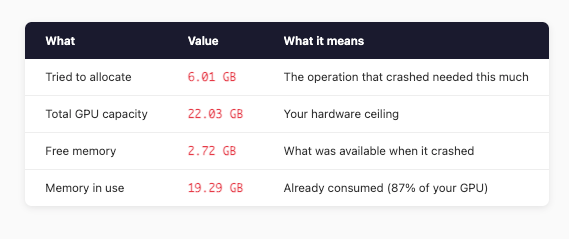
The math is simple: needed 6.01 GB, had 2.72 GB. We’re about 3.3 GB short.
The traceback also tells you where it happened—in my case, during _get_per_token_logps_and_entropies when computing logits = model(**model_inputs).logits. This is the forward pass computing output logits for all tokens in the batch.
Now we know the problem. Let’s figure out what’s eating our memory.
Where Does GPU Memory Actually Go in GRPO?
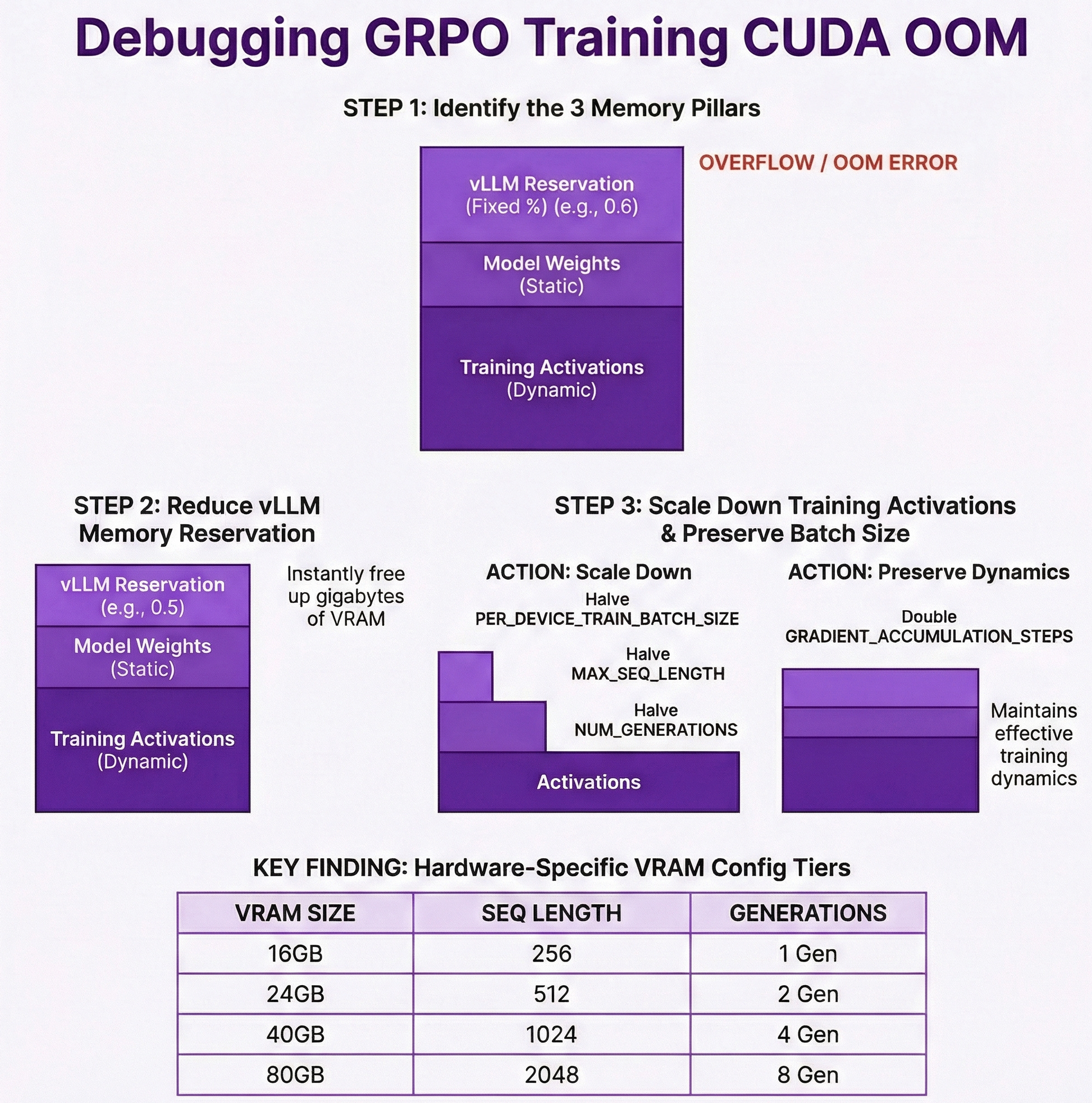
Before touching any config, you need to understand the memory consumers. In GRPO training, there are three main categories:
1. Model Memory (Usually Small)
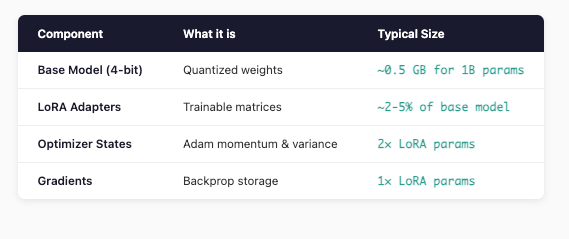
For a 1B parameter model with LoRA, this is usually under 1 GB total. Not our problem.
2. vLLM Inference Memory (The Hidden Hog)
GRPO uses vLLM for fast generation. Here’s the thing most people miss: vLLM reserves a fixed chunk of your GPU upfront.
GPU_MEMORY_UTILIZATION = 0.6 # vLLM takes 60% of GPU
On a 22GB GPU, that’s 13.2 GB gone before training even starts. This is often the biggest memory consumer and the easiest to adjust.
3. Training Activations (The Main Culprit)
This is where OOM errors usually originate. Activation memory scales with:
Batch size (
PER_DEVICE_TRAIN_BATCH_SIZE)Sequence length (
MAX_SEQ_LENGTH)Number of generations (
NUM_GENERATIONS)Model architecture (hidden dimensions, layers)
The rough formula:
Activation Memory ≈ batch_size × seq_length × hidden_dim × num_layers × 2 bytes
For Gemma 3 1B (hidden_dim=2048, 18 layers) with batch=4, seq=1024:
≈ 4 × 1024 × 2048 × 18 × 2 bytes ≈ 300 MB per forward pass
But here’s the kicker: GRPO generates NUM_GENERATIONS completions per prompt. With NUM_GENERATIONS=4, you’re multiplying that memory usage.
The Debugging Process: Show Your Work
Let me walk through exactly how I diagnosed my OOM error.
Step 1: List Everything
My original config:
MAX_SEQ_LENGTH = 1024
LORA_RANK = 32
GPU_MEMORY_UTILIZATION = 0.6
PER_DEVICE_TRAIN_BATCH_SIZE = 4
NUM_GENERATIONS = 4
Step 2: Calculate Each Component
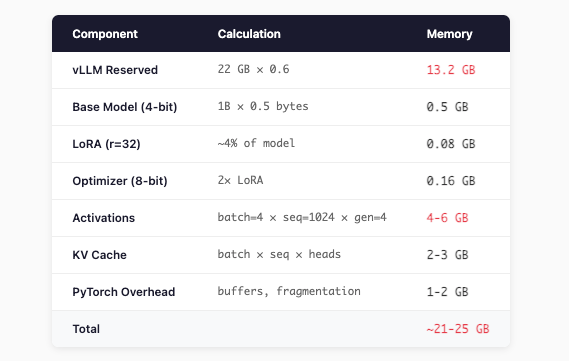
My GPU has 22 GB. I’m trying to fit 21-25 GB. No wonder it crashed.
Step 3: Identify the Biggest Levers
Priority order by impact:
GPU_MEMORY_UTILIZATION — Directly controls vLLM’s reservation. Biggest single lever.
NUM_GENERATIONS — Multiplies completion memory
PER_DEVICE_TRAIN_BATCH_SIZE — Multiplies all activations
MAX_SEQ_LENGTH — Affects activations and KV cache
LORA_RANK — Smaller impact, but contributes
The Fix: Targeted Changes
Based on the analysis, here’s my optimized config for a 22GB GPU:
# Model Configuration
MODEL_NAME = "google/gemma-3-1b-it"
MAX_SEQ_LENGTH = 512           # Reduced from 1024
LORA_RANK = 16                 # Reduced from 32
LOAD_IN_4BIT = True
GPU_MEMORY_UTILIZATION = 0.5   # Reduced from 0.6 (saves ~2.2 GB)

# Training Configuration
PER_DEVICE_TRAIN_BATCH_SIZE = 2  # Reduced from 4
GRADIENT_ACCUMULATION_STEPS = 2  # Increased to maintain effective batch size
NUM_GENERATIONS = 2              # Reduced from 4
New Memory Calculation
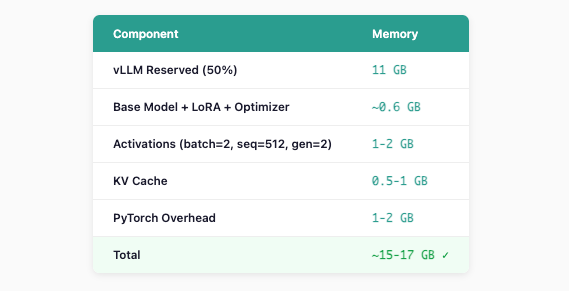
Headroom: 22 - 17 = ~5 GB free ✓
Preserving Training Dynamics
Notice I didn’t just slash everything—I increased GRADIENT_ACCUMULATION_STEPS:
Original:  batch_size=4 × grad_accum=1 = effective batch of 4
New:       batch_size=2 × grad_accum=2 = effective batch of 4  ✓
Same effective batch size, similar training dynamics.
Quick Reference: Configs by GPU Size
Here’s what I’ve found works reliably across different hardware:
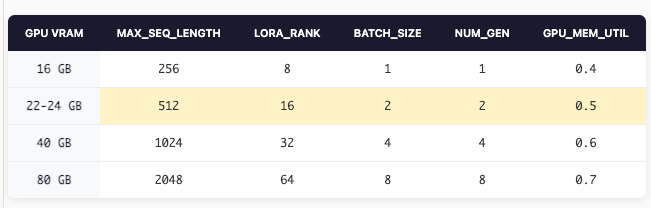
These aren’t magic numbers—they’re starting points based on the memory math above. Adjust based on your specific model and dataset.
Still Getting OOM? Emergency Measures
If you’ve applied the above and still hitting memory limits:
1. Reduce vLLM further
GPU_MEMORY_UTILIZATION = 0.4 # Aggressive, but works
2. Trim LoRA targets
# Instead of targeting everything, keep only essentials
LORA_TARGET_MODULES = ["q_proj", "v_proj"]  # Remove k_proj, o_proj, etc.
3. Set PyTorch memory config
export PYTORCH_CUDA_ALLOC_CONF=expandable_segments:True
4. Monitor in real-time
watch -n 1 nvidia-smi
Or in Python:
import torch
print(f"Allocated: {torch.cuda.memory_allocated()/1e9:.2f} GB")
print(f"Reserved: {torch.cuda.memory_reserved()/1e9:.2f} GB")
Understanding the Trade-offs
Every change has a cost. Know what you’re trading:
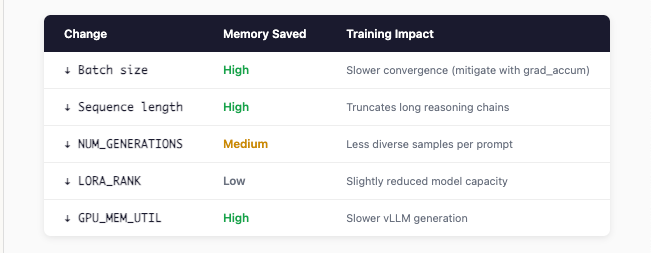
The goal isn’t to minimize memory—it’s to find the configuration that maximizes training quality within your hardware constraints.
The Takeaway
Stop randomly tweaking hyperparameters when you hit OOM. Instead:
Read the error — It tells you exactly how much memory you need vs. have
Map out your memory consumers — vLLM reservation, model, activations
Calculate before changing — Know where your memory is going
Target the biggest levers first — Usually vLLM util and batch size
Preserve what matters — Use gradient accumulation to maintain effective batch size
The difference between debugging systematically and debugging randomly is the difference between solving the problem in 10 minutes vs. 3 hours of frustration.
Hope this saves you some time on your next RL training run.
Have questions about GRPO training or running into other issues? Drop a comment below or reply to this email.
Fantastic breakdown of the memory allocation problem. The systematic approach of calculating each component before making changes is exactly what most people skip when debugging OOMs. I've wasted hours tweaking batch sizes randomly until stumbling on something that works, but mapping out vLLM reservation first makes way more sense. The tradeoff table at the end is gold, especially clarifying which paramaters affect quality vs just speed.